| Using Simulink | |
Add a trigger port to a subsystem.
Library
Description
Adding a Trigger block to a subsystem makes it a triggered subsystem. A triggered subsystem executes once on each integration step when the value of the signal that passes through the trigger port changes in a specifiable way (described below). A subsystem can contain no more than one Trigger block. For more information about triggered subsystems, see Chapter 7.
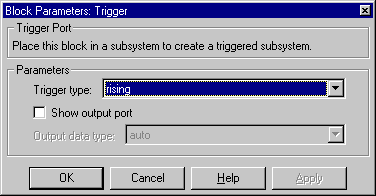
The Trigger type parameter allows you to choose the type of event that triggers execution of the subsystem:
rising triggers execution of the subsystem when the control signal rises from a negative or zero value to a positive value (or zero if the initial value is negative).falling triggers execution of the subsystem when the control signal falls from a positive or a zero value to a negative value (or zero if the initial value is positive).either triggers execution of the subsystem when the signal is either rising or falling.function-call causes execution of the subsystem to be controlled by logic internal to an S-function (for more information, see "Function-Call Subsystems" in Chapter 7).You can output the trigger signal by selecting the Show output port check box. Selecting this option allows the system to determine what caused the trigger. The width of the signal is the width of the triggering signal. The signal value is:
Data Type Support
A Trigger block accepts signals of any data type.
Parameters and Dialog Box
double or int8) of the trigger output. If you select auto, Simulink sets the data type to be the same as that of the port to which the output is connected.If the port's data type is not double or int8, Simulink signals an error.Characteristics
| Sample Time |
Determined by the signal at the trigger port |
| Dimensionalized |
Yes |
| | Transport Delay | Trigonometric Function | |