| Image Processing Toolbox | |
Using Predefined Filter Types
The function fspecial produces several kinds of predefined filters, in the form of computational molecules. After creating a filter with fspecial, you can apply it directly to your image data using filter2, or you can rotate it 180 degrees and use conv2 or convn.
One simple filter fspecial can produce is an averaging filter. This type of filter computes the value of an output pixel by simply averaging the values of its neighboring pixels.
The default size of the averaging filter fspecial creates is 3-by-3, but you can specify a different size. The value of each element is 1/length(h(:)). For example, a 5-by-5 averaging filter would be
0.0400    0.0400    0.0400    0.0400    0.0400
0.0400    0.0400    0.0400    0.0400    0.0400
0.0400    0.0400    0.0400    0.0400    0.0400
0.0400    0.0400    0.0400    0.0400    0.0400
0.0400    0.0400    0.0400    0.0400    0.0400
Applying this filter to a pixel is equivalent to adding up the values of that pixel's 5-by-5 neighborhood and dividing by 25. This has the effect of smoothing out local highlights and blurring edges in an image.
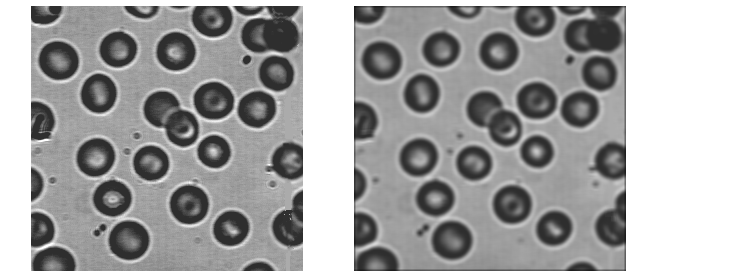
This example illustrates applying a 5-by-5 averaging filter to an intensity image.
I = imread('blood1.tif');
h = fspecial('average',5);
I2 = uint8(round(filter2(h,I)));
imshow(I)
figure, imshow(I2)
Figure 6-4: Blood.tif (left) and Blood.tif After Averaging Filter Applied (right)
Note that the output from filter2 (and conv2 and convn) is always of class double. In the example above, the input image is of class uint8, so the output from filter2 consists of double-precision values in the range [0,255]. The call to the uint8 function converts the output to uint8; the data is not in the proper range for an image of class double.
Another relatively simple filter fspecial can produce is a 3-by-3 Sobel filter, which is effective at detecting the horizontal edges of objects in an image.
h = fspecial('sobel')

h =

     1     2     1
     0     0     0
    -1    -2    -1
Unlike an averaging filter, the Sobel filter produces values outside the range of the input data. For example, if the input image is of class double, the output array may include values outside the range [0,1]. To display the output as an image, you can use imshow and specify the data range, or you can use the mat2gray function to convert the values to the range [0,1].
Note that if the input image is of class uint8 or uint16, you should not simply convert the output array to the same class as the input image, because the output may contain values outside the range that the class can represent. For example, if the input image is of class uint8, the output may include values that cannot be represented as 8-bit integers. You can, however, rescale the output and then convert it. For example,
h = fspecial('sobel');
I2 = filter2(h,I);
J = uint8(round(mat2gray(I2)*255));
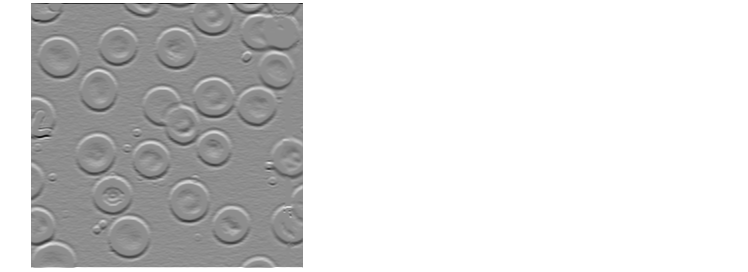
You can also use imshow to display the output array without first rescaling the data. The following example creates a Sobel filter and uses filter2 to apply the filter to the blood1 image. Notice that in the call to imshow, the intensity range is specified as an empty matrix ([]). This instructs imshow to display the minimum value in I2 as black, the maximum value as white, and values in between as intermediate shades of gray, thus enabling you to display the filter2 output without converting or rescaling it.
I = imread('blood1.tif');
h = fspecial('sobel');
I2 = filter2(h,I);
imshow(I2,[])
Figure 6-5: Blood.tif with Sobel Filter Applied
For a description of all the filter types fspecial provides, see the reference page for fspecial.
| | Higher-Dimensional Convolution | Filter Design | |