| Image Processing Toolbox | |
Dilation and Erosion
The main morphological operations are dilation and erosion. Dilation and erosion are related operations, although they produce very different results. Dilation adds pixels to the boundaries of objects (i.e., changes them from off to on), while erosion removes pixels on object boundaries (changes them from on to off).
Each dilation or erosion operation uses a specified neighborhood. The state of any given pixel in the output image is determined by applying a rule to the neighborhood of the corresponding pixel in the input image. The rule used defines the operation as a dilation or an erosion.
on, the output pixel is on. Otherwise, the output pixel is off.on, the output pixel is on. Otherwise, the output pixel is off.The neighborhood for a dilation or erosion operation can be of arbitrary shape and size. The neighborhood is represented by a structuring element, which is a matrix consisting of only 0's and 1's. The center pixel in the structuring element represents the pixel of interest, while the elements in the matrix that are on (i.e., = 1) define the neighborhood.
The center pixel is defined as floor((size(SE)+1)/2), where SE is the structuring element. For example, in a 4-by-7 structuring element, the center pixel is (2,4). When you construct the structuring element, you should make sure that the pixel of interest is actually the center pixel. You can do this by adding rows or columns of 0's, if necessary. For example, suppose you want the neighborhood to consist of a 3-by-3 block of pixels, with the pixel of interest in the upper-left corner of the block. The structuring element would not be ones(3), because this matrix has the wrong center pixel. Rather, you could use this matrix as the structuring element.
0     0     0     0
0     1     1     1
0     1     1     1
0     1     1     1
For erosion, the neighborhood consists of the on pixels in the structuring element. For dilation, the neighborhood consists of the on pixels in the structuring element rotated 180 degrees. (The center pixel is still selected before the rotation.)
Suppose you want to perform an erosion operation. Figure 9-1 shows a sample neighborhood you might use. Each neighborhood pixel is indicated by an x, and the center pixel is the one with a circle.
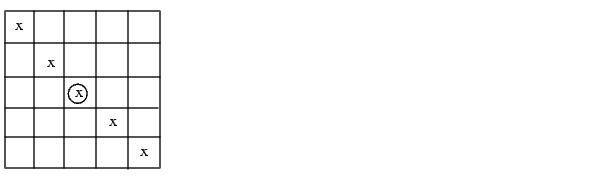
Figure 9-1: A Neighborhood That Will Represented as a Structuring Element
The structuring element is therefore
1     0     0     0     0
0     1     0     0     0
0     0     1     0     0
0     0     0     1     0
0     0     0     0     1
The state (i.e., on or off) of any given pixel in the output image is determined by applying the erosion rule to the neighborhood pixels for the corresponding pixel in the input image. For example, to determine the state of the pixel (4,6) in the output image:
on, then set the pixel in the output image (4,6) to on. If any of these pixels is off, then set the pixel (4,6) in the output image to off.You perform this procedure for each pixel in the input image to determine the state of each corresponding pixel in the output image.
Note that for pixels on borders of the image, some of the 1's in the structuring element are actually outside the image. These elements are assumed to cover off pixels. (See the earlier section, Padding of Borders.) As a result, the output image will usually have a black border, as in the example below.
The Image Processing Toolbox performs dilation through the dilate function, and erosion through the erode function. Each of these functions takes an input image and a structuring element as input, and returns an output image.
This example illustrates the erosion operation described above.
BW1 = imread('circbw.tif');
SE = eye(5);
BW2 = erode(BW1,SE);
imshow(BW1)
figure, imshow(BW2)
Figure 9-2: Circbw.tif Before and After Erosion with a Diagonal Structuring Element
Notice the diagonal streaks in the output image (on the right). These are due to the shape of the structuring element.
| | Morphological Operations | Related Operations | |