| Symbolic Math Toolbox |
  |
Calculus
The Symbolic Math Toolboxes provide functions to do the basic operations of calculus; differentiation, limits, integration, summation, and Taylor series expansion. The following sections outline these functions.
Differentiation
Let's create a symbolic expression.
syms a x
f = sin(a*x)
Then
diff(f)
differentiates f with respect to its symbolic variable (in this case x), as determined by findsym.
ans =
cos(a*x)*a
To differentiate with respect to the variable a, type
diff(f,a)
which returns df/da.
ans =
cos(a*x)*x
To calculate the second derivatives with respect to x and a, respectively, type
diff(f,2)
or
diff(f,x,2)
which returns
ans =
-sin(a*x)*a^2
and
diff(f,a,2)
which returns
ans =
-sin(a*x)*x^2
Define a, b, x, n, t, and theta in the MATLAB workspace, using the sym command. The table below illustrates the diff command.
f
|
diff(f)
|
x^n
|
x^n*n/x
|
sin(a*t+b)
|
cos(a*t+b)*a
|
exp(i*theta)
|
i*exp(i*theta)
|
To differentiate the Bessel function of the first kind, besselj(nu,z), with respect to z, type
syms nu z
b = besselj(nu,z);
db = diff(b)
which returns
db =
-besselj(nu+1,z)+nu/z*besselj(nu,z)
The diff function can also take a symbolic matrix as its input. In this case, the differentiation is done element-by-element. Consider the example
syms a x
A = [cos(a*x),sin(a*x);-sin(a*x),cos(a*x)]
which returns
A =
[  cos(a*x),  sin(a*x)]
[ -sin(a*x),  cos(a*x)]
The command
diff(A)
returns
ans =
[ -sin(a*x)*a,  cos(a*x)*a]
[ -cos(a*x)*a, -sin(a*x)*a]
You can also perform differentiation of a column vector with respect to a row vector. Consider the transformation from Euclidean (x, y, z) to spherical  coordinates as given by
  ,
,  , and
, and  . Note that
  corresponds to elevation or latitude while
  denotes azimuth or longitude.
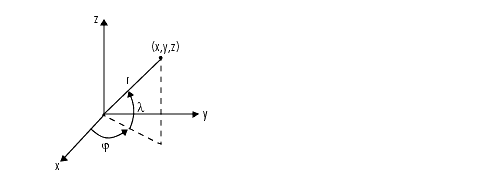
To calculate the Jacobian matrix, J, of this transformation, use the jacobian function. The mathematical notation for J is
For the purposes of toolbox syntax, we use l for  and
and f for  . The commands
syms r l f
x = r*cos(l)*cos(f); y = r*cos(l)*sin(f); z = r*sin(l);
J = jacobian([x; y; z], [r l f])
return the Jacobian
J =

[    cos(l)*cos(f), -r*sin(l)*cos(f), -r*cos(l)*sin(f)]
[    cos(l)*sin(f), -r*sin(l)*sin(f),  r*cos(l)*cos(f)]
[           sin(l),         r*cos(l),                0]
and the command
detJ = simple(det(J))
returns
detJ =
-cos(l)*r^2
Notice that the first argument of the jacobian function must be a column vector and the second argument a row vector. Moreover, since the determinant of the Jacobian is a rather complicated trigonometric expression, we used the simple command to make trigonometric substitutions and reductions (simplifications). The section Simplifications and Substitutions discusses simplification in more detail.
A table summarizing diff and jacobian follows.
Mathematical Operator
|
MATLAB Command
|

|
diff(f) or diff(f,x)
|

|
diff(f,a)
|

|
diff(f,b,2)
|

|
J = jacobian([r:t],[u,v])
|
| | Creating Symbolic Math Functions | | Limits | |
