| Using Simulink | |
Combine multiple signals into a single signal.
Library
Description
The Merge block combines its inputs into a single output line whose value at any time is equal to the most recently computed output of its driving blocks. You can specify any number of inputs by setting the block's Number of Inputs parameter.
| Note Merge blocks facilitate creation of alternately executing subsystems. See "Creating Alternately Executing Subsystems" on page 7-12 for an application example. |
A Merge block does not accept signals whose elements have been reordered. For example, in the following diagram,
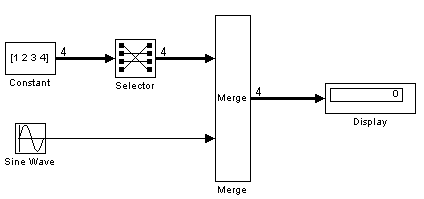
the Merge block does not accept the output of the Selector block because the Selector block interchanges the first and fourth elements of the vector signal.
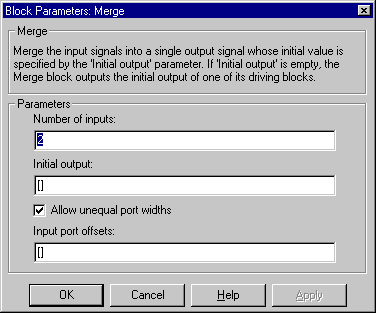
If the block's Allow unequal port widths option is not selected, the block accepts only inputs of equal dimensions and outputs a signal of the same dimensions as the inputs. If the Allow unequal port widths option is selected, the block accepts scalars and vectors (but not matrices) having differing numbers of elements. Further, the block allows you to specify an offset for each input signal relative to the beginning of the output signal. The width of the output signal is max(w1+o1, w2+o2, ... wn+on) where w1, ... wn are the widths of the input signals and o1, ... on are the offsets for the input signals. For example, the Merge block in the following diagram
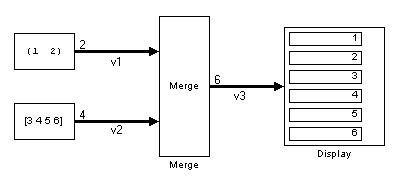
merges signals v1 and v2 to produce signal v3. In this example, the offset of v1 is 0 and the offset of v2 is 2, resulting in an output signal six elements wide. The Merge block maps the elements of v1 to the first two elements of v3 and the elements of v2 to the last four elements of v3.
You can specify an initial output value by setting the blocks Initial Output parameter. If you do not specify an initial output and one or more of the driving blocks do, the Merge block's initial output equals the most recently evaluated initial output of the driving blocks.
Data Type Support
A Merge block accepts signals of any numeric type (complex or real) and data type, including user-defined types. If the input type is user-defined, the initial condition must be 0.
Parameters and Dialog Box
Characteristics
| Sample Time |
Inherited from the driving block |
| Dimensionalized |
Yes |
| Scalar Expansion |
No |
| | Memory | MinMax | |