

| Using Simulink | |
Initialization Commands
Initialization commands define variables that reside in the mask workspace. These variables can be used by all initialization commands defined for the mask, by blocks in the masked subsystem, and by commands that draw the block icon (drawing commands).
Simulink executes the initialization commands when:
Initialization commands are valid MATLAB expressions, consisting of MATLAB functions, operators, and variables defined in the mask workspace. Initialization commands cannot access base workspace variables. Terminate initialization commands with a semicolon to avoid echoing results to the command window.
The Mask Workspace
Simulink creates a local workspace, called a mask workspace, when either of the following occurs:
The contents of a mask workspace include the variables associated with the mask's parameters and variables defined by initialization commands.
In the mx + b example, described earlier in this chapter, the Mask Editor explicitly creates m and b in the mask workspace by associating a variable with a mask parameter. The figure below shows the mapping of values entered in the mask dialog box to variables in the mask workspace (indicated by the solid line) and the access of those variables by the underlying blocks (indicated by the dashed line).
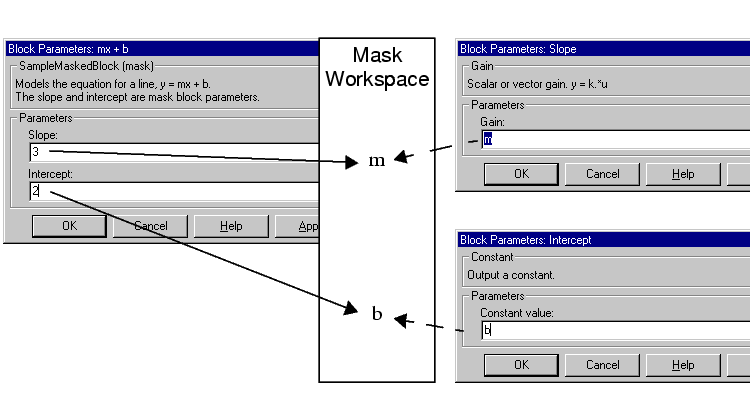
Mask workspaces are analogous to the local workspaces used by M-file functions. You can think of the expressions entered into the dialog boxes of the underlying blocks and the initialization commands entered on the Mask Editor as lines of an M-file function. Using this analogy, the local workspace for this "function" is the mask workspace.
Masked subsystems create a hierarchy of workspaces. The workspace of a masked block is a subspace of the model workspace and of the workspaces of any blocks that contain the masked block. A masked block can access all variables that are uniquely defined in its workspace hierarchy. The blocks in a masked subsystem can similarly access any uniquely defined variable in the masked subsystem's workspace hierarchy.
If a variable is defined in more than one place in the hierarchy, the masked block can access only the most local definition. For example, suppose that model M contains masked subsystem A, which contains masked subsystem B. Further suppose that B refers to a variable x that exists in both A's and M's workspaces. In this case, the reference resolves to the value of x in A's workspace.
| Note A masked block's initialization code can access only variables defined in the masked block's local workspace. |
Debugging Initialization Commands
You can debug initialization commands in these ways:
keyboard command in the initialization commands to stop execution and give control to the keyboard. For more information, see the help text for the keyboard command.dbstop if errordbstop if warning
If an error occurs in the initialization commands, execution stops and you can examine the mask workspace. For more information, see the help text for the dbstop command.
| | Tunable Parameters | The Icon Pane | |