| Using Simulink | |
Multiply block input by a specified value.
Library
Description
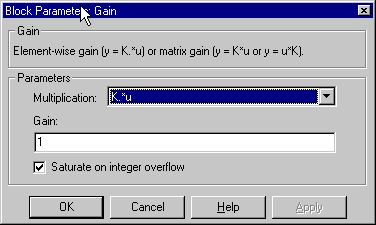
The Gain block generates its output by multiplying its input by a specified gain factor. You can enter the gain as a numeric value, or as a variable or expression in the Gain parameter field. The input and gain can be a scalar, vector, or matrix. The Multiplication parameter lets you specify whether to use element-by-element or matrix multiplication of the input by the gain.
The Gain block icon displays the value entered in the Gain parameter field if the block is large enough. If the gain is specified as a variable, the block displays the variable's name.
To modify the gain during a simulation using a slider control (see Slider Gain).
Data Type Support
The Gain block's support for data types depends on whether you select matrix or element-wise multiplication.
For matrix multiplication, the input and the gain must be a real or complex scalar, vector, or matrix value of type single or double.
For element-wise multiplication, a Gain block accepts a real- or complex-valued scalar, vector, or matrix input of any data type except boolean and outputs a signal of the same data type as its input. The elements of an input vector must be of the same type. A Gain block's Gain parameter can also be a real- or complex-valued scalar, vector, or matrix of any data type. A Gain block observes the following type rules:
uint8 and the gain is -1, an error results. If typecasting the gain parameter to the input data type results in a loss of precision, Simulink issues a warning and continues the simulation. int8, the actual output is 127 if the computed output is greater than 127 and -128 if the computed output is less than -128.Parameters and Dialog Box
K.*u (element-wise multiplication)K*u (matrix multiplication with the gain as the left operand)u*K (matrix multiplication with the gain as the right operand)1. If not specified, the data type of the Gain parameter is double. If the Gain parameter value is too long to be displayed in the block and element-wise multiplication is selected, the string -K- is displayed.Characteristics
| Direct Feedthrough |
Yes |
| Sample Time |
Inherited from driving block |
| Scalar Expansion |
Of input and Gain parameter |
| States |
0 |
| Dimensionalized |
Yes |
| Zero Crossing |
No |
| | Function-Call Generator | Goto | |