| Using Simulink | |
Add an enabling port to a subsystem.
Library
Description
Adding an Enable block to a subsystem makes it an enabled subsystem. An enabled subsystem executes while the input received at the Enable port is greater than zero.
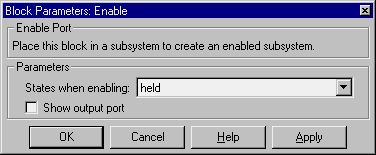
At the start of simulation, Simulink initializes the states of blocks inside an enabled subsystem to their initial conditions. When an enabled subsystem restarts (executes after having been disabled), the States when enabling parameter determines what happens to the states of blocks contained in the enabled subsystem:
reset resets the states to their initial conditions (zero if not defined).held holds the states at their previous values.You can output the enabling signal by selecting the Show output port check box. Selecting this option allows the system to process the enabling signal.
A subsystem can contain no more than one Enable block.
Data Type Support
The data type of the input of the Enable port may be any data type. See Chapter 8, Conditionally Executed Subsystems for more information about enabled subsystems.
Parameters and Dialog Box
Characteristics
| Sample Time |
Determined by the signal at the enable port |
| Dimensionalized |
Yes |
| | Dot Product | Fcn | |