| Using Simulink | |
Library
Description
The Display block shows the value of its input.
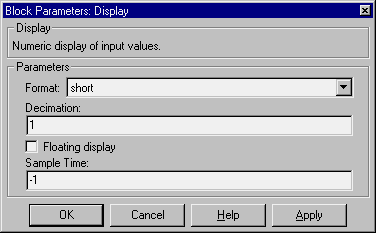
You can control the display format by selecting a Format choice:
short, which displays a 5-digit scaled value with fixed decimal pointlong, which displays a 15-digit scaled value with fixed decimal pointshort_e, which displays a 5-digit value with a floating decimal pointlong_e, which displays a 16-digit value with a floating decimal pointbank, which displays a value in fixed dollars and cents format (but with no $ or commas)To use the block as a floating display, select the Floating display check box. The block's input port disappears and the block displays the value of the signal on a selected line. If you select the Floating display option, you must turn off Simulink's signal storage reuse feature. See Signal storage reuse for more information.
The amount of data displayed and the time steps at which the data is displayed are determined by block parameters:
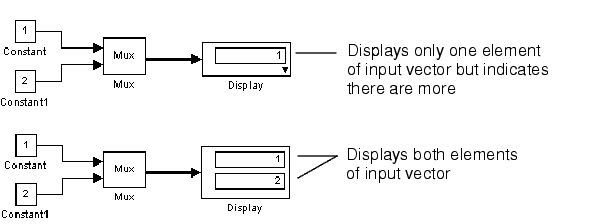
nth sample, where n is the decimation factor. The default decimation, 1, displays data at every time step.-1 causes the block to ignore sampling interval when determining which points to display.If the block input is an array, you can resize the block to show more than just the first element. You can resize the block vertically or horizontally; the block adds display fields in the appropriate direction. A black triangle indicates that the block is not displaying all input array elements. For example, the figure below shows a model that passes a vector (1-D array) to a Display block. The top model shows the block before it is resized; notice the black triangle. The bottom model shows the resized block displaying both input elements.
Data Type Support
A Display block accepts and outputs real or complex signals of any data type.
Parameters and Dialog Box
short.1, displays every input point.Characteristics
| Sample Time |
Inherited from driving block |
| Dimensionalized |
Yes |
| | Discrete Zero-Pole | Dot Product | |