| Target Language Compiler | |
Basic Inlined S-Function Written in TLC
Objective: To understand the differences between a noninlined S-function and an inlined S-function. This will help you develop a better understanding of when to use an inlined or noninlined S-function.
Example directory: tlctutorial/timestwo
Basic Code Generation
tlctutorial/timestwo/timestwo.c into your working directory.mex timestwo.c
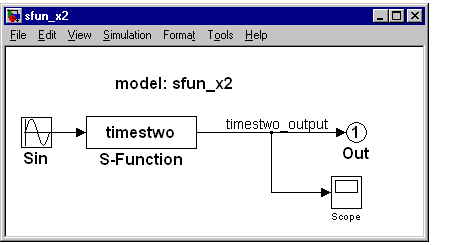
sfun_x2 using the Simulink S-function called timestwo. Your model should look like this.Note that timestwo.c code is a level-2 S-function. Level-2 S-functions are
beyond the scope of this training session. See the Simulink book Writing
S-Functions for more information.
Using C coded S-functions with generated code tend to add unnecessary
overhead. For simple S-functions where speed is crucial -- in cases such as
I/O device drivers -- you can rewrite the S-function as an inlined S-function
by creating a file with the same S-function name with a .tlc extension
(filename.tlc).
MdlOutputs and MdlTerminate portions of the generated C code, sfun_x2.c. Notice the overhead of calling the S-function. This necessary code allows for a generic API for S-functions. The next step is to inline your S-function by removing the SimStruct associated with your S-function (memory savings) and the generic API (speed up).| | TLC Tutorial | Creating an Inlined S-Function | |