| DSP Blockset | |
Cross-Rate Operations in Variable-Step and Fixed-Step SingleTasking Modes. In Simulink's Variable step and Fixed-step SingleTasking modes, a discrete-time signal is defined between sample times. Therefore, if you sample the signal with a rate or phase that is distinct from the signal's own rate and phase, you will still measure meaningful values. Note that in the recommended dspstartup settings, cross-rate operations generate an error even though the solver is in fixed-step single-tasking mode. This results from the Error setting for SingleTask rate transition under the Diagnostics pane in the Simulation Parameters dialog box.
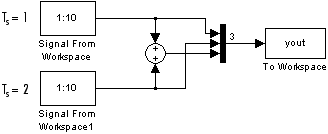
Example: Cross-Rate Operations. Consider the model below, which sums two signals having different sample periods. The fast signal (Ts=1) has sample times 1, 2, 3, ..., and the slow signal (Ts=2) has sample times 1, 3, 5, ....
The output, yout, is a matrix containing the fast signal (Ts=1) in the first column, the slow signal (Ts=2) in the second column, and the sum of the two in the third column.
yout =
     1     1     2
     2     1     3
     3     2     5
     4     2     6
     5     3     8
     6     3     9
     7     4    11
     8     4    12
     9     5    14
    10     5    15
As expected, the slow signal (second column) changes once every two seconds, half as often as the fast signal. Nevertheless, it has a defined value at every moment inbetween because Simulink implicitly auto-promotes the rate of the slower signal to match the rate of the faster signal before the addition operation is performed. Note that this example will generate an error under the dspstartup settings due to the Error setting for SingleTask rate transition in the Diagnostics pane in the Simulation Parameters dialog box.
In general, for Variable-step and Fixed-step SingleTasking modes, when you measure the value of a discrete signal in-between sample times, you are observing the value of the signal at the previous sample time.
| | Additional Settings for Discrete-Time Simulations | Sample Time Offsets | |